Thursday, June 23, 2011

iPad apps Mega-Update part 5: Musical Instrument apps

Edited 6/15/13: I see these posts are still getting a lot of traffic, two years later! Much of this info is outdated. However, I am working on updating my iPad app pages for 2013! I'll post to my blog as updates are completed, or you can check the page directly.

_____________________________________________


It's tough to even scratch the surface of the multitude of musical instrument apps in the App Store. I've not included some of the hardcore apps such as the amazing Korg synthesizer apps, Reactable, etc., because they are really intended for serious electronic musicians and aren't as suited to use in the lower and middle school classroom. I'm sure I'll be updating this list frequently!
  • Aeolian Harp: This is a beautifully relaxing instrument that creates gorgeous images as you play. More for personal meditations than use in the classroom.

  • Accordéon: This app takes over your screen and turns it into a full-sounding accordion!

  • Bebot: This adorable little robot is actually a highly functional synthesizer.

  • Celtic Harp: This full-screen, customizable harp has a beautiful, soothing sound.

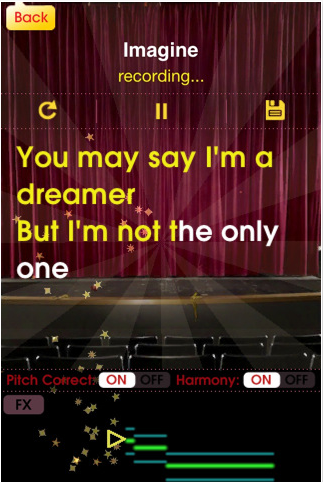
  • Glee Karaoke: If you don't mind the "Glee" branding, this is the best Karaoke app for iPad. Progress through songs and try to beat your high score (based on pitch and rhythm), and listen to top performances from around the world!
Screen shot 2011 06 25 at 12 01 20 AM

  • iGuzheng: A nice introduction to a popular Chinese zither. This app features beautiful demo songs and multitouch functionality for different effects.

  • iTabla Pro: If you are an Indian music performer or enthusiast, iTabla Pro is an incredible practice partner. 32 fully configurable taals are available, with table, two 5-string tanpuras, a shruti box, and more. iTabla can auto-tune to match your instrument. This is yet another example of an app that exceeds the performance of a dedicated hardware device, for a fraction of the cost. As far as apps go, though, this one is pricey ($25).

  • Magic Fiddle: Smule's Magic Fiddle is an expressive little virtual bowed stringed instrument. Go through a series of lessons, and share your performances with the world.

  • Magic Piano HD: An assortment of simplified keyboards, "light beams" to help you play classic tunes, and a social networking component make this another addictive app from Smule.

  • Melody Bell: I grew up playing handbells, so when I saw this app as part of the North Point iBand Christmas extravaganza, I had to have it! It's not a universal app, but the iPhone app looks great and is easier to play on the big screen.

  • Ratatap Drums: There are many virtual drum sets in the app store, including the nice one built in to GarageBand. Ratatap is one of my favorites of the dedicated drum apps.

  • ThumbJam: ThumbJam is a unique instrument designed completely for the iPad (and iPhone). 30 high-quality sounds are included, and in addition to your fingers (and thumbs!), this app uses the internal gyroscope as a controller. It also functions as a looper, and is compatible with AudioCopy/Paste. The configuration options and the fact that it doesn't rely on knowledge of real instrument technique make it excellent for the general music classroom.

  • YumiSynth: This is a unique bowed string simulator, in which one hand "bows" the instrument while the other fingers the notes. YumiSynth can be a highly expressive instrument with a little practice.

  • 50 in 1 Piano HD: There are probably hundreds of piano apps in the app store. Out of the ones I've tried, 50 in 1 Piano is one of my favorites. In addition to a good piano sound, it has 49 more high-quality sampled instruments, effects, drumbeat loops, and 120 piano lessons, and more.


iPad apps Mega-Update part 4: Music Production apps

Edited 6/15/13: I see these posts are still getting a lot of traffic, two years later! Much of this info is outdated. However, I am working on updating my iPad app pages for 2013! I'll post to my blog as updates are completed, or you can check the page directly.

_____________________________________________


  • EveryDay Looper: I just got this app and haven't had much time to play with it, but I already love it. For $6, you get a live performance tool that rivals many hardware loop stations worth hundreds of dollars. This video is worth a thousand words:


  • GarageBand: Apple's GarageBand for Mac has been a staple of my classroom technology use for three years. It was released for the iPad this spring, and for the most part, it does not disappoint. One thing I love about the iPad version is that it's easier to forbid students from using built-in loops–new files always default to a software or live instrument. There are a large number of high-quality sounds, cutting-edge virtual instruments, and "smart instruments," which are limited to a particular scale or chords. There are some limitations that are much more significant in certain styles of music than others. Like the desktop version, a song can only have one tempo. Unlike the desktop version, there is no piano roll editor, so if you make a mistake recording a track, your only option is to re-record. I'm guessing Apple will fix the latter problem in an update, since it's a major part of the desktop app.
One of the high-quality instruments built in to GarageBand


GarageBand's track view, very familiar to users of the desktop version.
  • iSequence: This is another recent purchase, and so far I think it's fantastic. iSequence is a pattern-based sequencer. Basic use is pretty intuitive (at least if you're somewhat familiar with sequencers), but if you're willing to spend some time with tutorials, it has some powerful features. You can loop sequences and record multiple tracks in real-time without ever hitting "stop," or you can step-record for the greatest accuracy. The app includes hundreds of instruments, mostly synths and kits, and has several high-quality additional banks for $1.99 each. There is also a built-in sampler, effects channels and mixer, and several import/export options. The next update will include full MIDI support. Here is a video combining iSequence and StudioTrack (below) with Audio Copy/Paste for a rockin' flute song:


  • Music Studio: Xewton's Music Studio was GarageBand for the iPad before GarageBand for the iPad was released. It is a powerful music production environment that is great for laying down a bunch of MIDI tracks. It also has a very functional piano roll editor, unlike GarageBand It comes with 40 free instruments; you can purchase 50 more high-quality instruments within the app for $14.99, or individual packages for less. Audio recording and .wav import are promised with the next update. Music Studio is pretty intuitive, even for younger students.
Music Studio's track view. Notice the tabs for changing modes.


Select and customize instruments in the instrument tab.


The double keyboard option. The two keyboards can record simultaneously onto separate tracks.
  • StudioTrack: StudioTrack is a high-quality 8-track recorder for the iPad. It includes AudioCopy/Paste and a number of other sharing options. The video above, under iSequence, uses AudioCopy/Paste to add a live flute track to an iSequence song.
  • Symphony Pro: Symphony Pro remains the best music notation option on the iPad, by quite a long shot. I was a beta tester for this app, and it has improved by leaps and bounds over the last year into quite a powerful notator. I use it primarily as a sketchpad for ideas, but it is becoming increasingly possible to use it as a primary notation tool for less complex scores. It still is more crash-prone than my other go-to music apps, which has given it a lower app store rating than it really deserves. I will do a full review of Symphony Pro in the near future. In the meantime, here is a screenshot:
Notes can be entered with the built-in keyboard or through tapping/dragging.


There isn't an actual lyric entry tool, but text boxes work for now.


iPad Mega-Update part 3: General Music Apps

Edited 6/15/13: I see these posts are still getting a lot of traffic, two years later! Much of this info is outdated. However, I am working on updating my iPad app pages for 2013! I'll post to my blog as updates are completed, or you can check the page directly.

_____________________________________________


  • ForScore: ForScore is my favorite sheet music library/reader app. ForScore came out shortly after the iPad was released, and the developers have released frequent updates that have turned into a huge, highly functional feature set. ForScore stores an unlimited number of PDF's, and has many ways to organize your music, a large downloadable library of mostly piano music, the ability to browse and download other scores within the app, page-turn customization including links for repeats, setlists, and fantastic annotation capabilities. An essential app for musicians!
A piece displayed in ForScore.
 
ForScore with the menu bar showing.
 
  • Note Goal Pro: So far, I'm not very happy with the selection of developmentally-appropriate music theory apps for kids. Note Goal Pro is good for what it does, however. Like most of the beginner-level theory apps, it is piano-based. However, with the option to put letter names on the keys, it can be used as a basic note-reading quiz app for children learning other instruments. It has a customizable interface, adjustable levels, achievements, and the ability to save multiple users' data so that students can save their progress.


Note Goal Pro's default display.

 
Note colors and names turned on.
  • Padrucci: I'm cheating a bit here, as this is the only app in this list that I do not yet own. It just came out on June 5, and it looks great–I'll be purchasing it soon and will publish an update. Padrucci is a dedicated app for browsing the Petrucci Music Library (imslp.org), an enormous online database of public domain music that is a great source for music reader apps such as ForScore.
  • Pandora: Pandora is one of those apps I love to share with folks who are suspicious of the whole technology revolution. Type in your favorite artist, composer, song, or genre, and Pandora will instantly create a streaming radio station that plays music of that artist/composer and music like it, gradually expanding its scope to introduce you to new songs and artists. You can bookmark songs, artists, or albums, link directly to iTunes, and give thumbs up/thumbs down to songs. The more you use the thumb feature, the smarter your station gets about choosing songs you like. Pandora is free, and therefore ad-supported, but the occasional ads are short and nothing compared to FM radio ads.
Pandora on the Wailin' Jennys channel
  • SoundCloud: Soundcloud is a cloud sharing service for music and other audio, allowing you to safely store and share your own audio files, and browse sounds from all over the world. The SoundCloud app is currently only available as an iPhone app, but it works fine on the iPad. You can record straight into the app, browse, add favorites, and share with other services through this easy-to-use app.

  • SoundHound: Soundhound is another one of those apps that feels like it's straight off of Star Trek. SoundHound listens to your music, whether a song on the radio or your own voice humming, and quickly and quite accurately identifies the song and gives you tons of information about it, including artist info, lyrics, etc. It's getting more features all the time!


iPad mega-update part 2: General apps for teaching

Edited 6/15/13: I see these posts are still getting a lot of traffic, two years later! Much of this info is outdated. However, I am working on updating my iPad app pages for 2013! I'll post to my blog as updates are completed, or you can check the page directly.

_____________________________________________


  • Edmodo: I have only just discovered Edmodo, a social network specifically designed for classroom use. It looks a lot like Facebook on the surface, but it is a completely safe, private network with full teacher control of her classroom sites. I plan to try out Edmodo with my Middle Schoolers next school year, and the iPad and iPhone apps are an easy way to access the site anywhere I go.

  • Keynote: Apple's presentation app, the third component of the iWork suite, really does put the "fun" in functional. I use it with the iPad projector adapter as a handy way to teach recorder and ukulele to a whole class. Like Pages and Numbers, you can sync your Keynote presentations to work on them on your desktop or iPhone.
A slide from my recorder Keynote presentation.
  • Planbook Touch: I use Jeff Hellman's Planbook software as my paperless lesson planning book. I love the desktop app, and the iPad version easily syncs through DropBox (free account required, see "DropBox" above). I find it very handy for accessing my lesson information on the go, but I don't recommend using it as a stand-alone app to replace your paper planbook until some more bugs and functionality issues are worked out.

  • Prezi: If you're a fan of the web-based presentation app Prezi, you must get the iPad app! Prezis look gorgeous on the iPad, and can of course be projected with the iPad projector adapter.

  • Remote Conductor: This is another app that I only discovered recently, but has become an invaluable part of my tech setup. Conductor basically turns my iPad into a wireless Magic Trackpad and keyboard for my laptop. If I'm using a Mac app with my projector, I can walk around the room controlling the computer remotely. Even better, I also set up my eBeam Edge interactive whiteboard, and the kids can go up to the board and interact with the "magic pen" while I use my iPad to input text or take over when necessary (sort of like those passenger-seat brakes in the driver's ed car).
  • Splashtop: Splashtop is a remote desktop app to use with your computer, Mac or PC. With Splashtop, your iPad mirrors your computer screen. In other words, it feels like you are running desktop applications on your iPad. I haven't had many situations where I've really needed this, but it has an extreme cool factor, and I could see using it to let kids use a desktop app such as Sibelius Groovy Music on an iPad.

Next up: General music apps!


Wednesday, June 22, 2011

iPads at Home and School, part one: Index and Productivity apps

Edited 6/15/13: I see these posts are still getting a lot of traffic, two years later! Much of this info is outdated. However, I am working on updating my iPad app pages for 2013! I'll post to my blog as updates are completed, or you can check the page directly.
_____________________________________________
One year ago, I wrote this post about my early favorite iPad apps for teaching, and it still receives more hits than any other post on my blog. My iPad has now become a regular part of my teaching workflow, and recently the Lower School received 8 shiny new iPads for classroom use. I'm also purchasing several iPads for use in the LS and MS music program next year, which I will sync with my account for access to my most snazzy (expensive) music apps. This series of posts is a list of my favorite 75+ apps, for personal use and for teaching. I've put short descriptions of the apps, and will post full reviews of some of them in later posts. Enjoy, and please add a comment if you have a great app I'm missing.

App categories for Jo's Massive List (these will become links as I publish each category):

Productivity apps:

  • Bento: Bento for the iPad is a simple, attractive database program that can work as a standalone product or sync with Bento for the Mac and/or iPhone. Information fields can include photos and other media–useful to music teachers is the recent addition of audio fields. I keep track of my students in Bento, divided into collections by class, with text fields for my notes on their progress and photos/recordings of projects.
    Bento (generic screenshot, since all my records have students' names and photos)
  • Corkulous: Corkulous was an early favorite app, though I am now more likely to use iThoughts or Pages because of their superior syncing ability and easy workflow. Corkulous is loads of fun for notetaking or simple scrapbooking, though, providing an unlimited number of virtual corkboards with notes, to-do items, photos, etc.
Corkulous
  • DropBox: Dropbox is a cloud storage service that provides 2GB free storage. You can access a wide variety of stored files from the iPad app, which are instantly synced between all your devices. The best thing about DropBox, however, is that many apps use it as a seamless way to keep your files synced within the app. Get an account now!
  • Evernote: I am always having to tell people that no, I don't work for this company. I just LOVE LOVE LOVE this app in all its forms! Evernote is a cloud-based note service that works through apps on the iPhone, iPad, desktop, and any web browser. You can quickly upload typed-in notes, pictures, PDF files, screenshots, web pages, etc. to Evernote where they are immediately available on all your devices. Evernote integrates with many apps and hardware. For example, right now I'm in the middle of scanning years of filed papers with my Fujitsu ScanSnap, which sends them directly to my "Paperless" folder in Evernote, where I can later add tags and other information. The other completely awesome thing about Evernote is that it goes through all your PDFs and images and performs text recognition on them so that absolutely everything is searchable. A basic account is completely free! Read more here.
Part of my "Brain" notebook in Evernote

  • iCab Mobile: iCab Mobile has become my go-to web browser on the iPad. It looks a lot like desktop Safari. It has tabbed browsing, allows downloads of many types of files, integrated DropBox support, etc.
  • iDisk: If you are a MobileMe user, this one is a no-brainer. Access your iDisk on the go. I'm assuming that this app will change as Apple integrates the new iCloud service and phases out MobileMe.
  • Informant HD: The built-in iPad Calendar app isn't bad, but one thing I miss from my Palm OS days is having a full-featured personal organizer with to-do integration. I've been pretty happy with Informant, which is also available on the iPhone. It syncs with your internal calendar and/or with Google calendar, and unlike other calendars I've tried, it's never messed up my data even though I sync with both, including several shared Google calendars. The to-do integration is well done, and after a bit of a learning curve, it is quick to enter or change data.
June 2011 in my Informant calendar
  • iThoughts HD: I haven't been using iThoughts for very long, but it already ranks at the top of my "favorite apps" list. I am a big fan of mindmapping for brainstorming and personal productivity, and iThoughts allows you to create beautiful mindmaps with an intuitive interface that does all the organizational work for you, while allowing all the customization you'd like.
My summer brainstorming iThoughts project
  • Numbers: One of Apple's iWork suite, Numbers is a beautiful spreadsheet app that is easy to use and creates professional-looking graphs and presentations. I don't use spreadsheets often, but it is fun to play with!
  • Outliner: CarbonFin Outliner is a great tool for linear organization. It's a simple but powerful app for creating hierarchical outlines.
  • Pages: Apple's own word processing app, part of the iWork suite, was one of the first apps to convince users that the iPad was much more than a media consumption device. It is quite a powerful word processor, with all the features you'd expect: many fonts, standard formatting options, the ability to insert photos and clip art, and, added recently, the ability to organize your docs into folders and wirelessly sync with your desktop or iPhone.

  • ToDo: Though I now use Informant HD as an all-inclusive personal organizer, Appigo's ToDo is a thing of beauty if you don't mind having a separate app for your to-do list. It uses a gorgeous intuitive interface with a variety of themes, and integrates well into the Getting Things Done (GTD) method of personal organization.
ToDo for the iPad


Stay tuned for Teacher apps!

Monday, May 2, 2011

Quote for this morning's news

"Are we seeking power for power's sake? Or are we seeking to make the world and our nation better places to live. If we seek the latter, violence can never provide the answer. The ultimate weakness of violence is that it is a descending spiral, begetting the very thing it seeks to destroy. Instead of diminishing evil, it multiplies it. Through violence you may murder the liar, but you cannot murder the lie, nor establish the truth. Through violence you may murder the hater, but you do not murder hate. In fact, violence merely increases hate. So it goes. Returning violence for violence multiplies violence, adding deeper darkness to a night already devoid of stars. Darkness cannot drive out darkness: only light can do that. Hate cannot drive out hate: only love can do that."


--Martin Luther King Jr.

Move Over Little Bugs, Muscle Ant is Here!

We're doing our GarageBand unit in First-Year Music Rotation in the Middle School. Before the students create their own projects, we compose a collaborative song to learn the basics of GarageBand, and how to do more than just use built-in loops. At lunch, several students had made up a chant to encourage a tiny ant carrying a large beetle across the sidewalk, so we incorporated that into our recorded audio. Are you ready, world? Here is "The Muscle Ant Song."