Showing posts with label apps. Show all posts

Wednesday, August 14, 2013

Updating my PLN for the new year

It's that time--everyone is gearing up for the new school year! My older two kids are carrying their new backpacks and lunch bags wherever they go; my baby is getting used to his daycare a few hours at a time (sniff). My house is a mess of new supplies and instruments!

I'm also updating my PLN and checking out a bunch of new apps and websites. One website that's recently caught my attention is Common Sense Media's Graphite. Graphite is a site for teachers, featuring reviews of computer apps, mobile apps, games, and websites for use in education. Each listing is reviewed by Common Sense Media writers, but educators can also add their own "field notes," a combination of ratings and classroom suggestions, and detailed lesson plans. The selection of resources isn't huge at the moment, since it only includes things reviewed by Common Sense Media itself, but there is a form for teachers to suggest apps and sites for review, as well as a submission form for developers. I think this site has lots of potential and I look forward to seeing it grow!

The Graphite beta home page

Another PLN tool I've been enjoying this summer is a new-ish feature in the popular iOS app Flipboard, which allows you to "flip" articles into your own magazines. These magazines can be private or shared with the community. Though I'm in the habit of saving articles and lesson ideas with my all-time favorite Evernote, Flipboard offers a beautiful reading interface and the ability to view your Twitter feed (and RSS feeds, and many more) in a magazine format, with links and photos already pulled up for you into articles.

Friday, June 28, 2013

ThumbJam--a powerful virtual instrument for everybody!

I included ThumbJam in my original iPad app lists, and not only do I still think it's one of the best virtual instrument apps out there, it's received a huge number of new features in the last two years. Oddly, I found out after my first mini-review that the developer and I not only grew up in the same smallish town, we shared a childhood best friend. Major small-world moment!
Though ThumbJam includes a high-quality library of sampled real instruments, from flute and violin to accordion and electric guitar, its interface does not attempt to imitate any of these. Instead, it is made up of a user-controllable number of parallel horizontal bars representing pitch. Part of the beauty of ThumbJam is how easy it is to jump in and play. Select an instrument, select a scale (a large selection of scales such as major, minors, blues, etc. is built-in, or you can create your own), and start playing!
Though it does work well to play with two thumbs, as the app name suggests, you can use more fingers if you like! Most instruments allow you to create vibrato and/or tremolo with your fingers, and some allow pitch bend by tilting or volume control along the horizontal bar. With some practice, it's possible to create a quite expressive solo.

Wednesday, June 19, 2013

Using iBooks for education

When iBooks author was released over a year ago, I was thrilled. I've had ideas for interactive books floating around in my head since I bought my first Kindle in 2007. I promptly opened up the new software, started three different projects, then got too busy with other side projects (like having more children, and writing a novel) and dropped all three.

Fast forward to the past school year. Some of the teachers in my Lower School have been using apps, mainly Book Creator with the assistance of Drawing Pad, to help kids design, write, and illustrate their own eBooks which can then be opened in iBooks and shared with friends and family. My own daughter absolutely loves creating these books and emailing them to me and Jos. Something about being able to "publish" your book into a shareable medium is extremely inspirational to children (and adults, for that matter! I suppose my blog falls into that category!).

The first pages of one of Micaela's books, including disclaimers.

I haven't used these apps with my own students, but I'm planning a project for the Fall where kids use the audio capability in Book Creator to create a soundtrack for their stories. More on that when it happens!

One obvious advantage of these apps over iBooks Author is that the creation process is entirely on the iPad. With students as creators, this is the least complicated option. iBooks Author, on the other hand, is a Mac-only app, and iBooks can only be read on iDevices. Right now, I see iBooks Author as the most powerful way for Mac-using teachers to create interactive iBook content for their students to use on iDevices, and in some cases, to get their content out to the wider community.* 

This year I had the perfect chance to reacquaint myself with iBooks Author–ten+ weeks of bedrest during a complicated pregnancy. I've always been one to create my own recorder materials for 3rd and 4th grade, so an interactive recorder method became my new project.

Sunday, November 13, 2011

NCMEA Annual Conference Links and Notes


This weekend, I attended the North Carolina Music Educators Association annual conference in Winston-Salem. In addition to attending some inspirational workshops, exploring the exhibits (and making quite a few purchases for my program), and hearing various all-state ensembles and choirs, I presented three music technology clinics as a part of NC TI:ME. Below are some notes and links from the presentations.

iPads in General Music

Here is a link to the Prezi I created for this workshop. In it, you'll find the names and prices of all the apps we discussed, and some ideas for integrating iPads into your curriculum.

Please also visit my iPad App Mega-Lists to read more about apps and see some screenshots.


Using iPads to teach a composition-based curriculum

Many of the ideas in my Prezi are for composition-based projects. I frequently write about my students' composition projects on my blog.


Using What You Have: Technology for the Imperfect Classroom

The best resources for the online music educator: the Music Educators' Personal Learning Network, and the National Association for Music Education

Two of my favorite tools for the classroom, planning, and personal use: Curio (Mac only), and Evernote (works on any platform including mobile)

For flexible, paperless lesson planning on the Mac, PC, or iPad, I use Jeff Hellman's Planbook

To keep a database of my students and their work, I use Bento

The eBeam Edge, a less expensive interactive whiteboard option


Portable, affordable, and durable MIDI entry keyboard: the Akai LPK 25

My favorite USB microphone for podcasting or performance: the Blue Snowball

RC Trackpad--turn your iOS device into a magic trackpad for your computer


Noteflight--free, web-based music notation software.

Indaba Music--free, web-based DAW, for audio recording and/or MIDI, with social networking features

Soundcloud--share audio tracks in the cloud

The Petrucci Music Library--a huge collection of public domain scores and recordings

ArtsEdge--activities and lesson plans


Explore the orchestra at Play Music

I'll be putting my recorder and ukulele Keynotes online soon. In the meantime, you can check out my beginner's ukulele tutorials on YouTube.

And, finally, I must put a link to my incredible school, a magical place that encourages teachers and students to explore their passions!

Wednesday, October 26, 2011

Making a Sound Effects Board with an iPad

This year, I'm experimenting with putting Forest and Mountain classes (3rd and 4th grade) into semi-permanent small groups for projects. We all had a lot of fun with our first project a few weeks ago. Using a short, open-ended story and the app Soundslate, each group worked together to enhance the story with sound effects. They could use a maximum of 4 built-in sound effects, and were required to record all of the other sounds using the built-in microphone and their voices, bodies, or instruments in the music studio. Many groups chose to use no built-in sounds at all, which I loved!

Though I learned quite a bit to make this project go more smoothly the next time around, the first try was mostly a success. In addition to learning how much power sound can have over how we experience a story, I found myself facilitating conflict resolution and teaching some basic acoustics, too! In the end, this little story became everything from a comedy/adventure to violent horror. Groups delighted in surprising me with an unexpected sound or humorous twist.

Here is one board, ready for performance:


The story (okay to reproduce for educational purposes):

John and Violet were bored. It was a Saturday in October and it felt like there was nothing to do.
"Let's go for a walk," said Violet. "Maybe we'll find something interesting."
The two friends set out right away. At the end of Violet's street, they followed a dirt path into the thick woods behind her neighborhood, looking for adventure.
At first, everything seemed ordinary. Birds were chirping, squirrels chattering in the branches above them. Just as Violet was about to suggest turning around, John froze in his tracks.
"Listen," he whispered.
At first, Violet didn't hear anything but the breeze rustling the leaves. But when the breeze stopped, she heard it too. There was a strange singing in the distance, like nothing she had heard before. 
Violet felt a chill down her spine, but her curiosity got the better of her. "Come on, John, let's find it!"
John looked nervous, but he wouldn't say so. "Okay," he agreed.
The pair walked for what seemed like hours, not speaking so they could hear the strange music. Finally they reached a creek Violet had never seen before.
"Look!" cried John.
Violet followed his gaze across the creek and saw a tiny wooden house. It looked too small for an ordinary person to live in. Flowers were planted outside the little front door, and smoke came out of a chimney barely taller than Violet's shoulders. One of two windows the size of a sheet of paper was opened, and they could hear the music coming from inside.
"What do you think it is?" whispered John, but Violet didn't answer. She had already leapt across the creek and was knocking on the door.
"No!" shouted John, but it was too late. 

Saturday, August 6, 2011

iPad update: ForScore 3.0

ForScore is one of my very favorite iPad apps. It's a pdf reader with dozens of features aimed at performing musicians. I keep over a thousand scores–piano, flute, ukulele, teaching materials, etc.–in my ForScore library right on my iPad.

The ForScore 3.0 update adds many new features, but there are two that I'm most excited about because of their potential for classroom application.

Versions: A problem inherent in many iPad apps is that they are really intended for a single user. If one student annotates a score in ForScore, the annotation is permanent until another student changes or erases it. Sometimes this is cool, other times it's downright annoying. With the new Versions feature, you can save up to 24 versions of the same file. These are still linked to the one iPad, but with Bluetooth sharing and Dropbox support, you can send them to other devices as a 4SC file with annotations intact. I'm hoping for invisible cloud syncing at some point, but this is a great start!

Darkroom: I often take pictures of scores or teaching materials to keep in Evernote for quick reference (and to avoid carrying around that gargantuan songbook collection). Now I can use my iPad's built-in camera to take a photo directly into ForScore. These won't look as good as the ones I uploaded from my actual scanner, but they are usable and the process couldn't be quicker.

I'll let you know how it all works out in the classroom...

Sunday, June 26, 2011

iPad apps Mega-Update part 8: Miscellaneous apps

Edited 6/15/13: I see these posts are still getting a lot of traffic, two years later! Much of this info is outdated. However, I am working on updating my iPad app pages for 2013! I'll post to my blog as updates are completed, or you can check the page directly.

_____________________________________________

My last category (for now!) includes apps that are favorites for personal and home use.

  • Amazon: A fun way to browse the world's largest store.
"Minds on Music" at Amazon.

  • AppAdvice: Easily access reviews and articles about all things "app." Many articles are added every day, and you can also browse dozens of thematic app lists.
Today's App news.
  • Casey's Contraptions: This is a delightfully designed game in which you help Casey create Rube Goldberg-type machines to complete simple tasks.
I'm gonna get you, cardboard boxes!
  • Chore Pad HD: A new favorite in my house, Chore Pad has a fun interface for creating weekly chore charts, a system for parents to apply stars to each chore, cute trophies, icons, and more. My daughter insists on checking off her chores each night at bedtime.
Hmm, looks like somebody hasn't been doing his chores...
  • Craft Finder: From Family Fun Magazine, Craft Finder has an impressive searchable library of crafts to do with kids.
Featured summer crafts.
  • Crosswords: My favorite crossword puzzle app! Easy to use, with loads of free crosswords each day.
A tough one.

  • Epicurious: Thousands of rated recipes in an easily searchable database. Create your own "recipe box," adjust amounts, search by ingredients, even create a shopping list.
Yummy.
  • Grocery IQ: My favorite grocery shopping list. I sync with my iPhone to actually shop, but the iPad version has an even slicker user interface.
Save a "Favorites" list to make future lists quick and easy.
Easily search for and "clip" coupons.


  • IMDB: If you like movies, IMDB (Internet Movie Database) is your perfect companion. Search for movies, view all the production details, read about actors, and read reviews, all in a handy interface.
IMDB home.


  • Insight Timer: Originally called Zen Timer, this is a nice customizable timer for meditation, yoga, or anytime that you would rather have a variety of peaceful Tibetan bells instead of typical alarms. It also includes a simple journal and a fun social networking feature.
Settings for a 30 minute yoga session.
  • Intellicast HD: In my opinion, the best weather app for the iPad.
Hot hot hot.
  • Zillow: If you are in the market for real estate, or just want to know the likely current value of your home, Zillow has a very useable map interface.


Saturday, June 25, 2011

iPad apps Mega-Update part 7: Non-music creative apps, social media, and readers

Edited 6/15/13: I see these posts are still getting a lot of traffic, two years later! Much of this info is outdated. However, I am working on updating my iPad app pages for 2013! I'll post to my blog as updates are completed, or you can check the page directly.

_____________________________________________


Creative apps:
  • Drawing Pad: There are many excellent drawing and painting apps available for the iPad. I chose Drawing Pad for this list because it is extremely easy to use, even for the youngest students. It offers a wide array of drawing tools, virtual stickers, and easy file saving and sharing.
Sometimes my daughter writes backwards...
  • iMovie: It is so much fun to edit movies on the iPad! iMovie for the iPad is similar in functionality to the desktop software. A must-have if you or your students make movies.


  • Toontastic: This is another recent purchase. I played with it at my sister's house and I had to have it! Toontastic allows you to easily create original stories with animated characters. You can choose music, narrate the story, and customize the animations. Designed in partnership with Stanford's Graduate School of Education, Toontastic teaches principles of storytelling and the relationship between words, images, and music in an incredibly fun way. You can share your stories and watch stories from around the world via the integrated "ToonTube."
The Story Arc helps you organize your story, and learn the principles of storytelling.


The introduction to my masterpiece, "Space Shark."


Social Media and Reader apps:

  • Blogsy: Though I still do most of my blogging on my laptop, this is my favorite on-the-go blogging app.
It's this page, on Blogsy!
  • Flipboard: Flipboard is a great showcase app for the iPad. It turns your Google Reader feed, Twitter, or Facebook feed, or numerous curated Flipboard feeds into a gorgeous virtual magazine. You can flip through stories, tap on them to read the full text, follow links in an integrated browser, and share stories in a variety of ways.
My Twitter feed.
  • Read it Later/Instapaper: These apps both allow you to save articles or other media for later, offline reading. They integrate with many popular apps and browsers.
Read It Later.
  • Reeder: I organize the blogs and news feeds I read through Google Reader. Reeder is an elegant, no-frills app for browsing and reading your Google Reader feeds. It makes good use of multitouch gestures, and has many options for saving or sharing articles.
Minimalist, and highly functional.
  • Tweet Library: Tweet Library is a unique app for Twitter users who would like to permanently save their Tweets. If you use Twitter a lot, especially if you use it to record your daily life or for professional development, Tweet Library is worth its rather hefty price for an iOS app.
Saving the tweets for the great-grandkids.
  • Twitter: Twitter's own free app is my favorite app for browsing and posting tweets. Some find the interface too busy, but I love it.
I love the way you can layer columns, and pull them in or out of the screen. Very intuitive.

iPad apps Mega-Update part 6: Non-music-specific educational apps

Edited 6/15/13: I see these posts are still getting a lot of traffic, two years later! Much of this info is outdated. However, I am working on updating my iPad app pages for 2013! I'll post to my blog as updates are completed, or you can check the page directly.

_____________________________________________


  • Assorted Children's Books–Cat in the Hat, Toy Story, Paco Bongo, Lilup, The Grouchies, When I Grow Up, Violet books, just to name a few: Interactive children's books are a real highlight of the App store. Many of them are what I imagined as the books at Hogwarts. The best would be excellent children's books in any form, but the iPad version is enhanced with the ability to have the book read to you (many highlight the words as they are read), have surprises in the pictures (from a wagging tail to an interactive hide-and-seek game), and some even have integrated games. Our most recent purchase, "Weird Al" Yankovich's When I Grow Up, is an instant favorite. Not only is the book read hilariously by Weird Al himself, who could resist the chance to play an embedded "Tarantula Shaver," "Gorilla Masseuse," or "Snail Racer" video game?
A page from When I Grow Up
  • Art Authority: A simply gorgeous app that puts thousands of works of art right in your pocket. This was my first "expensive" app purchase ($10) and it has been worth that many times over.
Visiting the Baroque Gallery
  • Google Earth: One of our Lower School teachers who has been the most apprehensive about the introduction of too much technology into the classroom was at the staff meeting in which our new iPads were introduced. There, she played with Google Earth. That night, she ordered her own iPad, and she was signing them out for her students the next week. Simply amazing, with countless educational possibilities.
I can see Russia from my house!
  • Kindle/iBooks: Amazon Kindle or Apple's iBooks? If you do all your eBook reading on the iPad, it probably makes the most sense to comparison shop, as both offer excellent reading experiences. I personally use the Kindle app, because I do a lot of my reading on an actual Kindle, and I love the ability to sync between all my devices.
A page of Minds on Music using the Kindle app. I have it set to Sepia.
A page from Naked Eggs and Flying Potatoes on iBooks
  • NASA: Great for the space enthusiast! Find out the latest NASA news and access photos from various satellites and the Hubble space telescope.
Hey, I still see Pluto!
  • Netflix: If you are a Netflix member, you can stream movies and shows straight on your iPad for no additional fee. Many excellent documentaries are also available.
A selection of documentaries available for streaming.
  • NPR: Access news, arts and entertainment stories, and listen to NPR shows.


  • Our Choice: Al Gore's Our Choice is a fantastic example of what an ebook can be, with beautifully integrated video, audio, photography, animations, and more. Learn about climate change and related global issues in an immersive way.


  • PBS and PBS Kids: Access a large variety of educational programming from PBS and PBS Kids with these apps.


  • Qwiki: Qwiki is an addictive educational app that is difficult to explain, so here is the description from the iTunes store: "Curious? Explore 3,000,000 topics in a format perfect for the iPad: learn about what's near you, across the world - and everything in between. Labeled 'a seed that will blossom into an Internet wonder' by the NY Times, Qwiki combines thousands of sources to present concise, interactive summaries of millions of people, places and things in an experience optimized for the iPad. Explore topics by searching or browse a worldwide map highlighting landmarks, monuments, cities, towns, and more."
Natural Wonders to explore in Qwiki.
  • Science 360: Science360 creates a panoramic matrix of science and engineering images from NSF funded researchers and institutions. Zoom in, and you see short descriptions. Tap on an image to open the article. It's a great way to browse the cutting edge of science.


  • Tour Wrist: Like Google Earth, Tour Wrist is a showcase app for the iPad. Described as "virtual teleportation," Tour Wrist has panoramas from around the world that you view by holding the iPad in front of you as if it is a window into the location. Move the iPad around for a full 360 degree view. Though many of the sites you can visit on Tour Wrist are hotel ballrooms, real estate for sale, etc., there are plenty of historical sites and natural wonders from all over the world. And if it makes you dizzy to turn around with your iPad, you can switch to touchscreen controls.
I'm in a French cathedral!
Pointing my iPad at the floor, I see that someone was buried under me in 1231.
  • YouTube: The YouTube app comes pre-installed on iPads, and it is still one of the best ways to find videos on any topic from all over the world (plus a whole lot of trash!).
Who is that silly lady?


Thursday, June 23, 2011

iPad apps Mega-Update part 5: Musical Instrument apps

Edited 6/15/13: I see these posts are still getting a lot of traffic, two years later! Much of this info is outdated. However, I am working on updating my iPad app pages for 2013! I'll post to my blog as updates are completed, or you can check the page directly.

_____________________________________________


It's tough to even scratch the surface of the multitude of musical instrument apps in the App Store. I've not included some of the hardcore apps such as the amazing Korg synthesizer apps, Reactable, etc., because they are really intended for serious electronic musicians and aren't as suited to use in the lower and middle school classroom. I'm sure I'll be updating this list frequently!
  • Aeolian Harp: This is a beautifully relaxing instrument that creates gorgeous images as you play. More for personal meditations than use in the classroom.

  • Accordéon: This app takes over your screen and turns it into a full-sounding accordion!

  • Bebot: This adorable little robot is actually a highly functional synthesizer.

  • Celtic Harp: This full-screen, customizable harp has a beautiful, soothing sound.

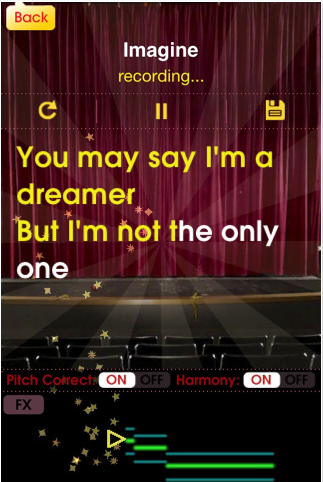
  • Glee Karaoke: If you don't mind the "Glee" branding, this is the best Karaoke app for iPad. Progress through songs and try to beat your high score (based on pitch and rhythm), and listen to top performances from around the world!

Screen shot 2011 06 25 at 12 01 20 AM

  • iGuzheng: A nice introduction to a popular Chinese zither. This app features beautiful demo songs and multitouch functionality for different effects.

  • iTabla Pro: If you are an Indian music performer or enthusiast, iTabla Pro is an incredible practice partner. 32 fully configurable taals are available, with table, two 5-string tanpuras, a shruti box, and more. iTabla can auto-tune to match your instrument. This is yet another example of an app that exceeds the performance of a dedicated hardware device, for a fraction of the cost. As far as apps go, though, this one is pricey ($25).

  • Magic Fiddle: Smule's Magic Fiddle is an expressive little virtual bowed stringed instrument. Go through a series of lessons, and share your performances with the world.

  • Magic Piano HD: An assortment of simplified keyboards, "light beams" to help you play classic tunes, and a social networking component make this another addictive app from Smule.

  • Melody Bell: I grew up playing handbells, so when I saw this app as part of the North Point iBand Christmas extravaganza, I had to have it! It's not a universal app, but the iPhone app looks great and is easier to play on the big screen.

  • Ratatap Drums: There are many virtual drum sets in the app store, including the nice one built in to GarageBand. Ratatap is one of my favorites of the dedicated drum apps.

  • ThumbJam: ThumbJam is a unique instrument designed completely for the iPad (and iPhone). 30 high-quality sounds are included, and in addition to your fingers (and thumbs!), this app uses the internal gyroscope as a controller. It also functions as a looper, and is compatible with AudioCopy/Paste. The configuration options and the fact that it doesn't rely on knowledge of real instrument technique make it excellent for the general music classroom.

  • YumiSynth: This is a unique bowed string simulator, in which one hand "bows" the instrument while the other fingers the notes. YumiSynth can be a highly expressive instrument with a little practice.

  • 50 in 1 Piano HD: There are probably hundreds of piano apps in the app store. Out of the ones I've tried, 50 in 1 Piano is one of my favorites. In addition to a good piano sound, it has 49 more high-quality sampled instruments, effects, drumbeat loops, and 120 piano lessons, and more.